AI agents: real risks and how to use them sensibly
What changes when an AI doesn’t just answer but acts: files, commands, browser and messages. The risks documented by the projects themselves (prompt injection, permissions, keys) and a checklist.
What changes with an agent
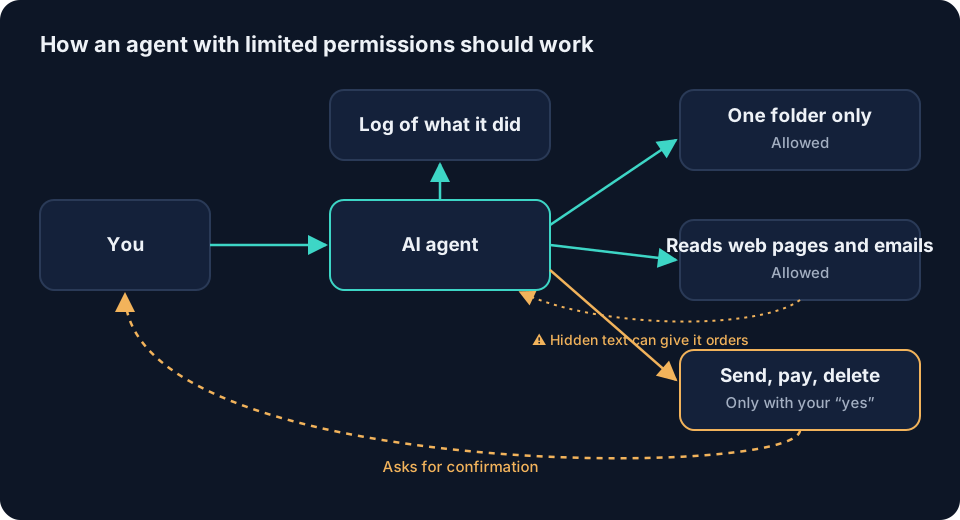
An AI agent doesn’t just answer: it acts. According to each project’s documentation, tools such as Hermes Agent, OpenClaw or OpenBot can read and change files, run commands, use a browser, send messages or schedule tasks. OpenBot’s own website warns that its agents can do so without asking each time, and recommends giving them only tasks you trust and keeping backups.
The documented risks
| Risk | What it is | What to do |
|---|---|---|
| Prompt injection | A web page, email or file hides instructions for the agent | Ask it to treat what it reads as information and to warn you |
| Too many permissions | The agent can touch more than it needs | Enable only the tools the task requires; use a sandbox if available |
| Orders from third parties | In a chat, someone else can give it orders | Allowlists, pairing and required mentions in groups |
| Exposed keys | API keys give access to paid services | Don’t paste them into chats; store them where the tool says |
| Untrusted MCP servers | A local MCP server runs code on your computer | Install only servers from known sources and limit their tools |
| Internet exposure | A dashboard or service open to the network can be used by anyone | Keep it on your computer (127.0.0.1) unless you know how to protect it |
The MCP protocol’s security documentation lists, among the attacks it describes, the compromise of local MCP servers and recommends scope minimisation. OpenClaw’s covers prompt injection, tool permissions, the browser and network exposure, and offers an audit with openclaw security audit.
Checklist before letting it work
- Is it working in a test folder, with no personal data?
- Have you turned off the tools it doesn’t need (browser, terminal, messaging)?
- Can only you give it orders?
- Does it ask for confirmation before deleting, sending or paying?
- Do you have a recent backup?
- Do you know how to stop it and uninstall it?
What an agent should never do for you
- Manage your banking, payments or investments.
- Handle identity documents, health data or other people’s data.
- Send messages on your behalf without you reviewing them.
More in data you should never paste into an AI.
Frequently asked questions
What’s the difference between a chatbot and an agent?
A chatbot answers with text. An agent also acts: it opens files, runs commands, browses or sends messages. That makes it more useful and also riskier.
What is prompt injection?
An attack in which a text the agent reads (a web page, an email, a document) contains hidden instructions to make it do something you didn’t ask for. OpenClaw’s security documentation has a dedicated section on it.
Is it safe to connect an agent to WhatsApp or Telegram?
It can be if you limit who can message it. For example, OpenClaw replies to strangers with a pairing code by default and lets you allowlist authorised numbers.
Should I let an agent handle my accounts or my money?
It isn’t advisable. Keep banking, payments, identity documents and health data out of its reach.
Glossary · Safety and good use
Keep reading
Sources
- Seguridad del Gateway (OpenClaw) — OpenClaw Foundation
- OpenBot: preguntas frecuentes sobre seguridad — OpenBot
- Security Best Practices (Model Context Protocol) — Model Context Protocol
- Installation: herramientas opcionales (Hermes Agent) — Nous Research (GitHub)
Change log
- : First published.
Educational content, prepared with the help of AI tools, with sources cited. It is not a substitute for professional advice. Tools change fast: if you spot something out of date, write to us at contacto@cognenza.com. How we work.